Simple thick lens#
This example shows how to create and analyze a simple thick lens as described in the paper ZOSPy: optical ray tracing in Python through OpticStudio. The code resembles the example of the paper with the addition of plotting the analysis results.
Included functionalities#
Sequential mode:
Building a simple sequential optical system.
Usage of
zospy.analyses.mtf.fft_through_focus_mtfto calculate the FFT through focus MTF.Usage of
zospy.analyses.psf.huygens_psf()to perform a Huygens PSF analysis.
Warranty and liability#
The examples are provided ‘as is’. There is no warranty and rights cannot be derived from them, as is also stated in the general license of this repository.
This example requires to connect to OpticStudio as extension. Also make sure ZOSPy is in sequential mode before running this example.
Import dependencies#
[1]:
from warnings import warn

import matplotlib.pyplot as plt

import zospy as zp
Setup the connection#
Initiate the connection to OpticStudio
[2]:
zos = zp.ZOS()
oss = zos.connect(mode="extension")
Get the primary system and make sure it is an new, empty system
[3]:
oss.new()
Set up the optical system#
Alter some system settings regarding the aperture size
[4]:
oss.SystemData.Aperture.ApertureValue = 10
Add the SCHOTT glass catalog if it is not already in use
[5]:
if "SCHOTT" not in oss.SystemData.MaterialCatalogs.GetCatalogsInUse():
    oss.SystemData.MaterialCatalogs.AddCatalog("SCHOTT")

print("Catalogs currently in use:", " ".join(oss.SystemData.MaterialCatalogs.GetCatalogsInUse()))
Catalogs currently in use: SCHOTT
Create an input beam for viewing purposes
[6]:
input_beam = oss.LDE.InsertNewSurfaceAt(1)  # behind the object surface
input_beam.Thickness = 10
Make a 10 mm thick lens with a radius of curvature of 30 mm and material type BK10
[7]:
front_surface = oss.LDE.GetSurfaceAt(2)
front_surface.Radius = 30
front_surface.Thickness = 10
front_surface.SemiDiameter = 15
front_surface.Material = "BK10"

back_surface = oss.LDE.InsertNewSurfaceAt(3)
back_surface.Radius = -30
back_surface.Thickness = 29
back_surface.SemiDiameter = 15
Specify the detector surface
[8]:
image_surface = oss.LDE.GetSurfaceAt(4)
image_surface.SemiDiameter = 5
Render the model#
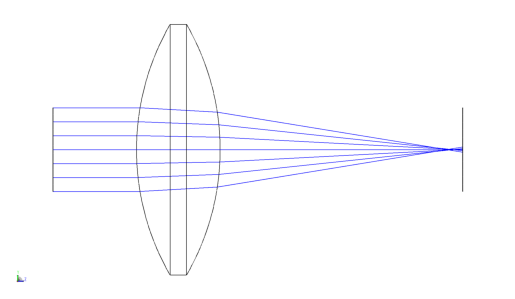
[9]:
draw3d = zp.analyses.systemviewers.viewer_3d(
    oss,
    surface_line_thickness="Thick",
    ray_line_thickness="Thick",
    number_of_rays=7,
    hide_x_bars=True,
    oncomplete="Release",
)

if oss._ZOS.version < (24, 1, 0):
    warn("Exporting the 3D viewer data is not available for this version of OpticStudio.")
else:
    plt.imshow(draw3d.Data)
    plt.axis("off")
Analyze the model and show the results#
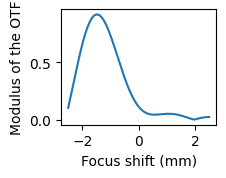
Calculte the FFT through focus MTF and plot it
[10]:
mtf = zp.analyses.mtf.fft_through_focus_mtf(oss, sampling="512x512", deltafocus=2.5, frequency=3, numberofsteps=51)
[11]:
fig = plt.figure(figsize=(2, 1.5))
ax = fig.add_subplot(111)
ax.plot(mtf.Data.index, mtf.Data[("Field: 0,0000 (deg)", "Tangential")])
ax.set_xlabel("Focus shift (mm)")
_ = ax.set_ylabel("Modulus of the OTF")
Calculate the Huygens PSF and plot it
[12]:
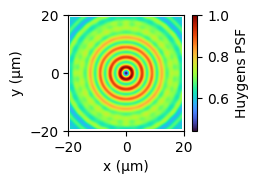
huygens_psf = zp.analyses.psf.huygens_psf(oss, pupil_sampling="512x512", image_sampling="512x512", normalize=True)
[13]:
fig = plt.figure(figsize=(2, 1.5))
ax = fig.add_subplot(111)
im = ax.imshow(
    huygens_psf.Data,
    cmap="turbo",
    extent=[
        huygens_psf.Data.columns.values.min(),
        huygens_psf.Data.columns.values.max(),
        huygens_psf.Data.index.values.min(),
        huygens_psf.Data.index.values.max(),
    ],
)
plt.colorbar(im, label="Huygens PSF")
ax.set_xlabel("x (μm)")
ax.set_ylabel("y (μm)")
ax.set_xticks([-20, 0, 20])
_ = ax.set_yticks([-20, 0, 20])