Raytracing analyses on a Double Gauss lens#
This example shows how to determine, perform and subsequently plot single ray traces and ray fan analyses in a Double Gauss lens. The code depends on the example file “Double Gauss 28 degree field.zmx”, which is provided by OpticStudio.
Included functionalities#
Sequential mode:
Usage of
zospy.analyses.raysandspots.single_ray_trace()to perform a single ray trace.Usage of
zospy.analyses.raysandspots.ray_fan()to perfrom a ray fan analysis.
Warranty and liability#
The examples are provided ‘as is’. There is no warranty and rights cannot be derived from them, as is also stated in the general license of this repository.
Import dependencies#
[1]:
from pathlib import Path

import matplotlib.pyplot as plt
import numpy as np
import pandas as pd

import zospy as zp
Input variables
[2]:
# Number of rays per field
number_of_rays = 3

# Field coordinates, as angles w.r.t. the entrance pupil
fields = [0, 10 / 14, 1]

# Plot colors for fields and wavelengths
colors = ["b", "g", "r"]
Connect to OpticStudio in standalone mode. Analyses in standalone mode are significantly faster than in extension mode, because the user interface does not need to be updated.
[3]:
zos = zp.ZOS()
oss = zos.connect(mode="standalone")
Load the Double Gauss 28 degree field.zmx example file provided by OpticStudio.
[4]:
system_file = Path(zos.Application.SamplesDir) / "Sequential/Objectives/Double Gauss 28 degree field.zmx"
oss.load(system_file)
Single raytrace analysis#
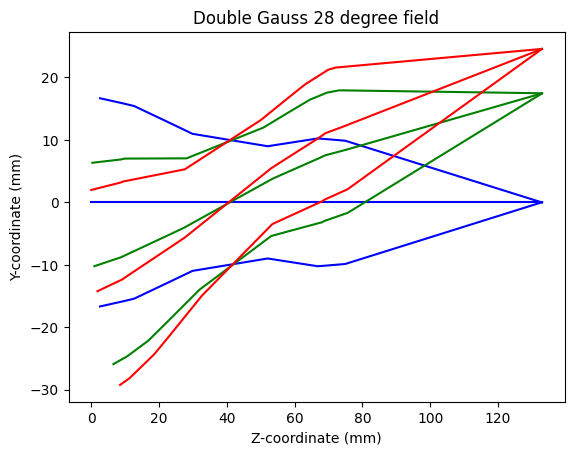
Perform a single raytrace analysis for every field and plot the results.
[5]:
# Loop through field coordinates
for i, hy in enumerate(fields):
    # Loop through pupil coordinates
    for py in np.linspace(-1, 1, number_of_rays):
        # Run single ray trace
        raytrace_result = zp.analyses.raysandspots.single_ray_trace(
            oss, hy=hy, py=py, wavelength=2, global_coordinates=True
        )

        # Extract real ray data
        rays = raytrace_result["Data"]["RealRayTraceData"]

        # Plot rays
        plt.plot(rays.loc[1:]["Z-coordinate"], rays.loc[1:]["Y-coordinate"], color=colors[i])

plt.xlabel("Z-coordinate (mm)")
plt.ylabel("Y-coordinate (mm)")
plt.title("Double Gauss 28 degree field")
[5]:
Text(0.5, 1.0, 'Double Gauss 28 degree field')
Ray fan analysis#
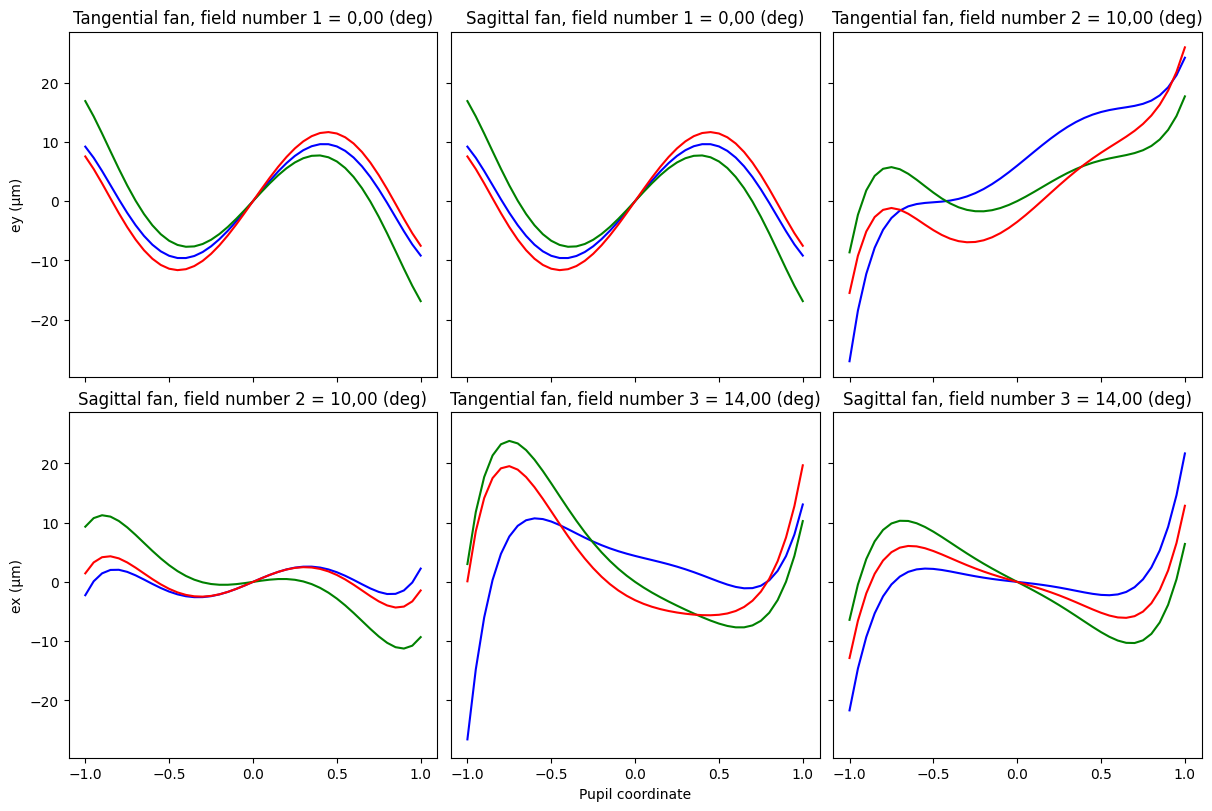
Run a ray fan analysis and plot the results.
[6]:
ray_fan_result = zp.analyses.raysandspots.ray_fan(oss, number_of_rays=20, wavelength="All", field="All")

fig, axs = plt.subplots(2, 3, sharex=True, sharey=True, figsize=(12, 8), constrained_layout=True)

plot_data = {k: v for (k, v) in ray_fan_result["Data"].items() if isinstance(v, pd.DataFrame)}

for ax, (key, value) in zip(axs.flat, plot_data.items()):
    for j in range(value.shape[1] - 1):
        x = value["Pupil"]
        y = value.iloc[:, [j + 1]]
        ax.plot(x, y, c=colors[j])

        ax.set_title(key)


axs[1, 1].set_xlabel("Pupil coordinate")
axs[0, 0].set_ylabel("ey (µm)")
axs[1, 0].set_ylabel("ex (µm)")
[6]:
Text(0, 0.5, 'ex (µm)')